How I Use Obsidian
Recently, I've found myself introducing more and more friends to Obsidian.
For those unfamiliar: Obsidian can act as a nice markdown editor for taking structured notes. It's sort of like a local-first hybrid of Notion and Roam Research. Obsidian is local-first and works with markdown files on your laptop, so it has a bunch of nice properties: 1) it's always available 2) it's fast 3) it works remarkably well with Claude Code.
I've been a daily Obsidian user since November, 2021 (I checked my daily notes), and it's gradually become my 'personal operating system' for a lot of my own thinking and writing. In that time, I've become more opinionated about how it should work.
This post serves as a sort of guide for how I work with it.
The golden rule of note-taking
I have one rule of working with Obsidian and other note-taking apps:
The primary goal of the tool should be eliciting thought. Nothing else matters.
It is easy to get caught up in the 'most optimal note-taking setup'. Automations, tagging, etc, etc. I've now come to believe that the only thing that matters is whether your system causes you to have better (and probably more) thoughts.
There are all sorts of corollaries that fall out of this:
- Don't think too hard about where to put notes. If you need to make a decision every time you take a note, you probably are recording fewer thoughts!
- Don't obsess over organizing old notes. It's tempting to want to spend time 'tending to your note-taking garden'. Maybe you want it all formatted the same way or to follow some sort of standard. But I don't think this makes much sense. 99% of the time I never re-visit my notes, and that is fine. The number one goal is to elicit my thoughts. The only time I use folders now is for automations (daily/ or clippings/), where the folder structure is done for me.
- Notes are for you. The other benefit I like from Obsidian is that the state is all local (encrypted if you use Obsidian sync or iCloud). I originally didn't think this would matter that much, but there's something freeing about knowing your notes will not leak.
When in doubt, respect the golden rule. It's almost always better to just start writing.
Systems I use
Daily note - the backbone of my notes is the 'daily note'. I leverage the 'daily note' plugin and make sure to set a hotkey for it (Ctrl+Shift+D). I set a template for it (stored in templates/Daily.md) just to get started, which I refresh every ~6mo or so. Here's what my current template looks like.
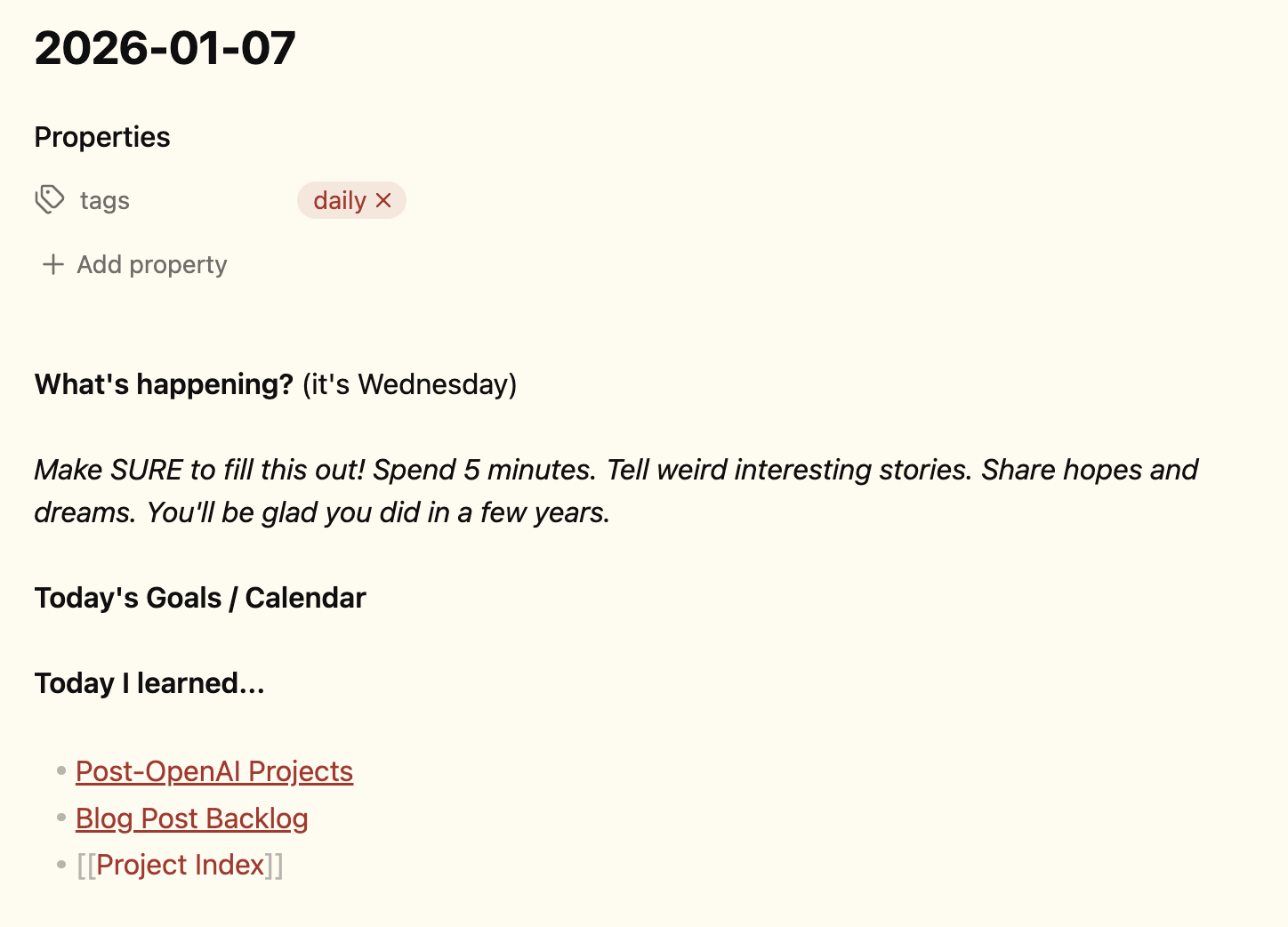
Again, the point of this is so I don't have a blank page and I can just get started writing. I'll typically journal in the "What's happening?" section, and then add any goals I'd like to finish to the goals/calendar. I have some standard links I keep to remind myself of longer term projects, but I haven't been using these a ton.
Beyond the daily note, I have a few types of long-lived notes: Projects, Nouns, Lists, and Docs.
Project notes revolve around some sort of longer-lived project. I am pretty free-form with these (see rule #1). Rather than worry about organizing them, I'll typically just come up with a name for the project that's a single word and then add an em-dash (colons aren't allowed) to whatever. If it's some point-in-time doc, I'll typically add a month it's related to (e.g. Dec '25).
Right now, I'm hacking on an app called Tacit so this is what that looks like:
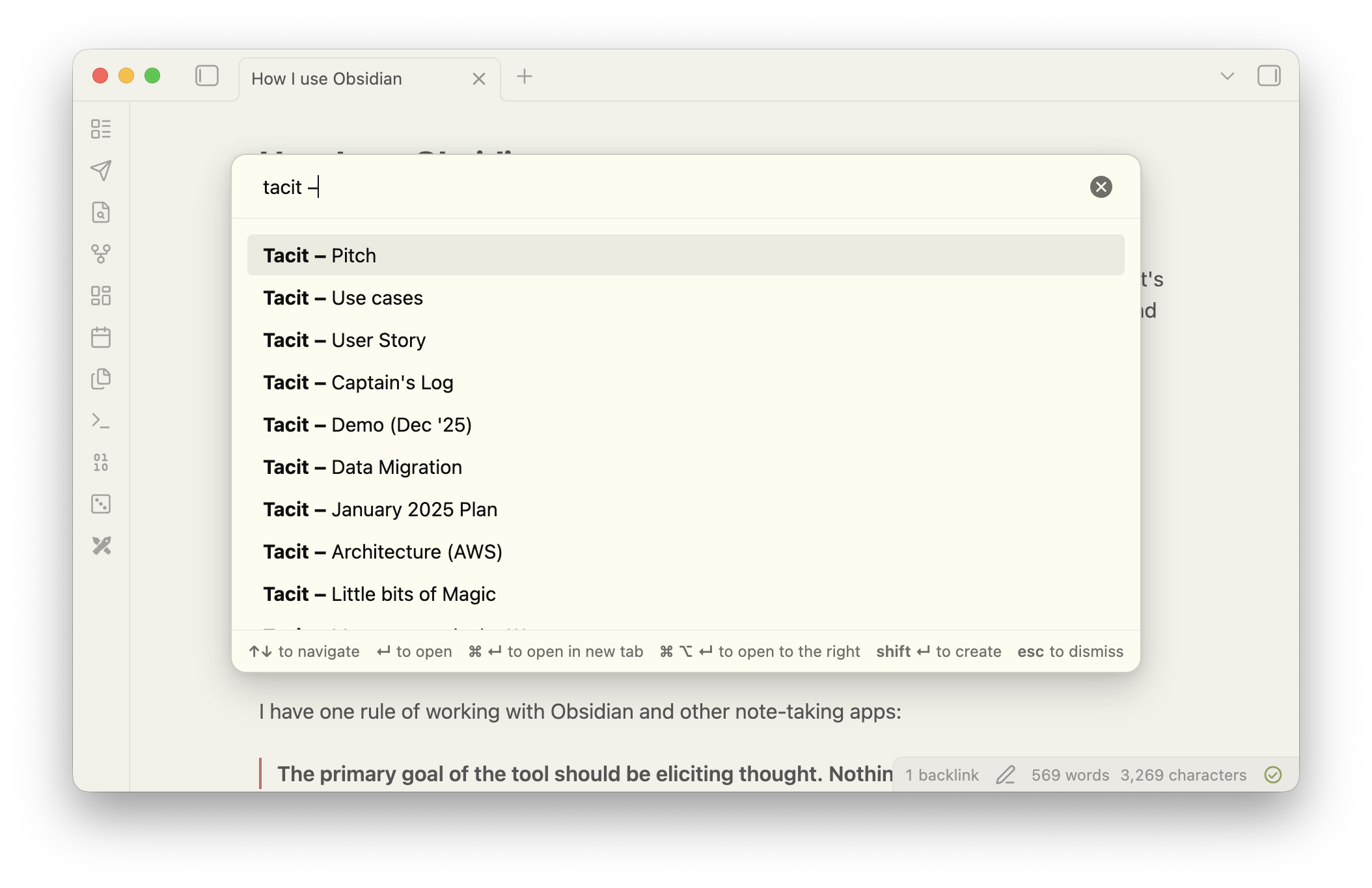
I'll sometimes create a "Captain's Log" doc for running notes. Again, I'm not too precious about structure here.
Nouns typically reference some long-lived thing that I'll come into contact with again and again: people, companies, restaurants, concepts / mental models. I tend to give these their own note and take notes directly there. I have a short meeting template which basically is just a header with the current date which I'll insert whenever I interact with that entity.
Lists are almost always things that I want to keep track of and pretty self explanatory: book recs, goals, etc.
Docs are kind of the 'catch-all' for when an idea seems worth exploring. Rather than fire up an entirely new note, my typical workflow is to add the stub to my daily note as one of my TODOs, then go in and flesh out the doc. I'm not sure why, but something about seeing a stub that needs to be written causes me to want to flesh it out.
Hotkeys + Slash Commands. Using Obsidian well means learning the hotkeys. You don't need all of them, but I do use a handful on a very regular basis:
- Daily notes: ctrl+shift+d, (next: ctrl+shift+n, prev: ctrl+shift-p)
- New note: ctrl+n
- Formatting: bold (cmd+b), italic: (cmd+i)
- Open/Search: cmd+o
- Add/Complete TODO: cmd+l
- Slash command: insert template, insert today's date
MacWhisper. If I ever get stuck writing, I've often found some use in 'changing modes'. Transcription software has gotten good enough that I'll just start speaking and that usually allows me to go from there. I like MacWhisper, which (like Obsidian) works locally and is out of the way. I've configured the right option key to toggle it on and off. I use NVIDIA's parakeet model which I find is both fast and accurate. I like the fact that I control where the voice appears by where my cursor is.
Theme: Flexoki. For the longest time I didn't care much for themes and just used the default. I've recently fallen in love with Steph Ango's (Obsidian creator) Flexoki theme, so I use that. I find it feels a little more personal, which gets me to write slightly more on the margin.
Templates. I use a couple of templates. There's the Daily template which is the whole note (shown above). I have a Weekplan template which I use to plan my weeks. And I have a 'meeting' template which I insert into one of the "noun notes" whenever I have a meeting.
Stuff I use occasionally
Web Clipper. One of the officially supported ways to integrate with Obsidian is the web clipper. Every so often, I'll find myself starting to copy/paste from some website, and then remember I can just click a button and it will create a new note in clippings/. Useful for saving things like recipes or referencing specific blog/reddit posts.
Claude Code. Because it's all markdown, Claude Code is very good at things like Semantic Search or updating parts of your vault. I've also used it to keep track of stuff that I'm doing (e.g. put this in my daily note for obsidian).
Mobile app. If there's one place which I have a slightly mixed bag, it's the mobile app. Don't get me wrong, Obsidian has a great mobile app which is actually really well designed. But the fact that it's local first means that it effectively downloads a bunch of markdown while you're using the app, leading to the occasional skew issues. I wish there were a better way to do voice transcription → notes on the device but everything I've tried is sort of kludge-y due to the way that Apple has setup the ecosystem on iPhone
Then there's stuff I tried and don't really use much anymore: tagging, folder organization, complicated templates, community plugins. I am sure these are great, but I don't find them that useful. I don't use Obsidian for obsessively managing TODOs anymore. I treat each day as a new todo list, and then I keep moving.
Interesting Outcomes
When I first started using Obsidian, I tried to add too much structure. Now I find I just start writing about whatever is on my mind. Daily notes have gotten to the point where they've become a habit, they are pretty much the first thing I start looking at when I start my day.
My friend Titiaan asked me if there were any downsides to using Obsidian. The main one I've found is that I now need to write in order to think. It's sort of hard for me to deal with a complex decision without spending some time writing about it.